Orders
After installing the module, new options have appeared in the Prestashop menu. One is Orders ->` Beslist.nl orders`. When you navigate there, you will see an overview of all Declined orders in the system (both from the Netherlands and from Belgium).
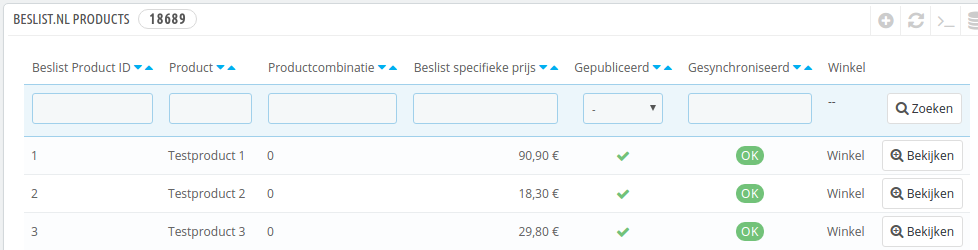
Beslist.nl orders
Orders overview
Navigate to Orders ->` Beslist.nl orders`. You should see ‘Synchronize orders’ at the top of the screen.
With this button the orders of Beslist are retrieved and put in your system. You can then process the order through your internal order processing process. You can click on the order to navigate to the Prestashop order screen.
Prestashop order screen
In the Prestashop order screen you can find the Decide order reference in the ‘Payment’ panel.
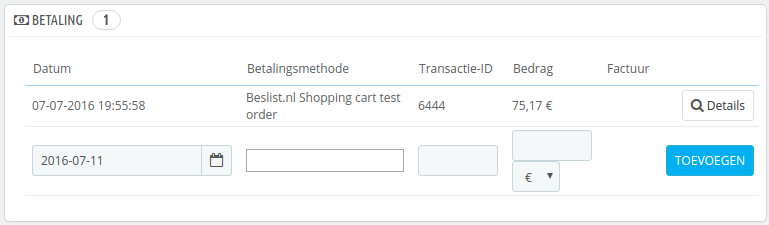
Order reference
Possible errors
When synchronizing, it is possible that an error is given. Here you will find an overview.
Can not find a product
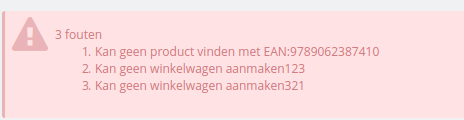
Product not known
The error message Can not find a product with eg code: XXXXX is caused by the fact that there is no product with the number that has been reported back by Beslist. Create a product with this number and synchronize the orders again. The other errors (Can not create a shopping cartXXX) are caused by the first error. Check for certainty also what value you have entered in the Decision product reference field configuration of the module.
Warning when importing multiple orders
The warning is due to a bug in Prestashop core, the problem can not hurt, but a [bug report] (http://forge.prestashop.com/browse/PSCSX-7858) has been created. You can remove the warning by manually creating an override class for the Cart class (see code block below).
/**
 * Get the delivery option selected, or if no delivery option was selected,
 * the cheapest option for each address
 *
 * @param Country|null $default_country
 * @param bool         $dontAutoSelectOptions
 * @param bool         $use_cache
 *
 * @return array|bool|mixed Delivery option
 */
public function getDeliveryOption($default_country = null, $dontAutoSelectOptions = false, $use_cache = true)
{
    static $cache = array();
    $cache_id = (int)(is_object($default_country) ? $default_country->id : 0).'-'.(int)$dontAutoSelectOptions.'-'.$this->id;
    if (isset($cache[$cache_id]) && $use_cache) {
        return $cache[$cache_id];
    }

    $delivery_option_list = $this->getDeliveryOptionList($default_country);

    // The delivery option was selected
    if (isset($this->delivery_option) && $this->delivery_option != '') {
        $delivery_option = Tools::unSerialize($this->delivery_option);
        $validated = true;
        foreach ($delivery_option as $id_address => $key) {
            if (!isset($delivery_option_list[$id_address][$key])) {
                $validated = false;
                break;
            }
        }

        if ($validated) {
            $cache[$cache_id] = $delivery_option;
            return $delivery_option;
        }
    }

    if ($dontAutoSelectOptions) {
        return false;
    }

    // No delivery option selected or delivery option selected is not valid, get the better for all options
    $delivery_option = array();
    foreach ($delivery_option_list as $id_address => $options) {
        foreach ($options as $key => $option) {
            if (Configuration::get('PS_CARRIER_DEFAULT') == -1 && $option['is_best_price']) {
                $delivery_option[$id_address] = $key;
                break;
            } elseif (Configuration::get('PS_CARRIER_DEFAULT') == -2 && $option['is_best_grade']) {
                $delivery_option[$id_address] = $key;
                break;
            } elseif ($option['unique_carrier'] && in_array(Configuration::get('PS_CARRIER_DEFAULT'), array_keys($option['carrier_list']))) {
                $delivery_option[$id_address] = $key;
                break;
            }
        }

        reset($options);
        if (!isset($delivery_option[$id_address])) {
            $delivery_option[$id_address] = key($options);
        }
    }

    $cache[$cache_id] = $delivery_option;

    return $delivery_option;
}
I can not import products that are not in stock ^^^^^^^^^^^^^^^^^^^^^^^^^^^^^^^^^^^^^^^^^^^^^^^^^^ ^^^^^^^^
This is possible, but then the products must be orderable (including on your website). You can change this functionality by creating an override class for Product, and putting the following code in it (see opposite / below)
public static function isAvailableWhenOutOfStock($out_of_stock)
{
    // @TODO 1.5.0 Update of STOCK_MANAGEMENT & ORDER_OUT_OF_STOCK
    static $ps_stock_management = null;
    if ($ps_stock_management === null) {
        $ps_stock_management = Configuration::get('PS_STOCK_MANAGEMENT');
    }

    if (!$ps_stock_management || isset(Context::getContext()->employee)) {
        return true;
    } else {
        static $ps_order_out_of_stock = null;
        if ($ps_order_out_of_stock === null) {
            $ps_order_out_of_stock = Configuration::get('PS_ORDER_OUT_OF_STOCK');
        }

        return (int)$out_of_stock == 2 ? (int)$ps_order_out_of_stock : (int)$out_of_stock;
    }
}