
Channable integration
It is possible to use the module in combination with a 3rd party such as Channable. For this it is necessary that the layout of the ID is set with Channable. If you use the standard setting, it is possible that it is not yet right. The settings below ensure that you can work with the Standard productmatcher setting of the module.
Product IDs
The feed must specify a product ID that matches the product ID that is returned by the Order API. Within Channable this field is known as the store product code. This field is set by default to the Prestashop database ID of the product.
Check whether this is actually the case. You can do this on the tab ‘finalize’ of your Beslist Shopping cart channel. Here the field store product code must be set to` id`.

winkelproductcode should be on id
Also check on the `rules` tab if there are no rules that modify the id. The only adjustment to the `id` field is the adjustment described below.
Productcombination IDs
If your webshop uses product combinations (products with different sizes / colors) you have to add a line to your Beslist Shopping Cart Channel, so that the combination is sent instead of the product.
If your products use combinations, you have a variant field on the product screen of Channable (see image below). If that is not the case, you can contact Channable to have this changed.
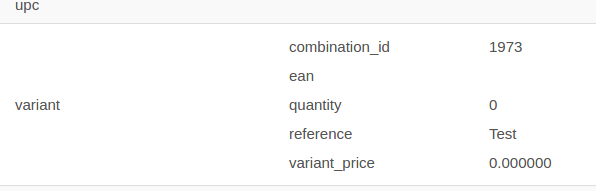
variant field
If you have the variant field, you can create a rule so that the id is adjusted when the product is a combination. You do this by creating a new line at the Rules tab of your Beslist Shopping cart channel. The rule must have the following settings:
- Name: Prestashop variant ID
- If: variant.combination_id isn’t empty
- Then: take id and combine value: variant.combination_id-id (Click on the plus and click in the blue box to select a field)
If it is good, the rule will look like this:
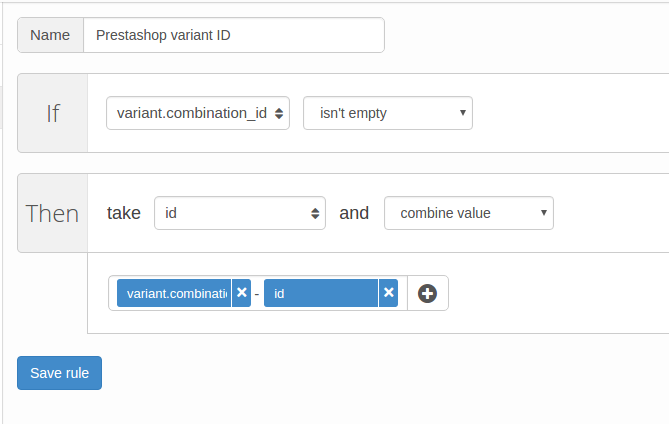
variant rule
Test
You can now look at the product in your feed. The product for which the combination exists should now have field like
<winkelproductcode>id_combinatie-id_product</winkelproductcode>
Also for the products without combinations the field should look like
<winkelproductcode>id_product</winkelproductcode>